

Almost every business starts out managing its data in simple, familiar files, and for a while that setup works fine. But as a company takes on more clients, more orders, and more moving parts, the same files that once kept things organized start creating new problems instead of solving them. Knowing where the cracks usually appear – and which processes deserve a proper system instead – makes the difference between growing smoothly and constantly patching things up.
Why Spreadsheets Continue to Play a Role in Business Operations
A spreadsheet is often the first tool any company reaches for, and there's a reason it sticks around. An excel spreadsheet or a google spreadsheet requires no onboarding, costs little, and lets almost anyone organize numbers within minutes. Built-in spreadsheet formulas cover basic calculations and quick summaries without needing a developer. "Some teams go a step further and build entire task boards with excel spreadsheets for project management, color-coding deadlines and owners across a single tab. Others prefer keeping that same board in the cloud, running a project management google spreadsheet that the whole team can open and edit at once.
For a young company or a simple, low-volume process, project management spreadsheets can genuinely get the job done. The trouble starts as the business grows: more orders, more clients, more departments needing the same data at once. That's when spreadsheet limitations surface – version conflicts, disconnected files, and manual copying that no longer scales. Comparing a flexible spreadsheet against a structured CRM system vs. Excel makes this gap clear rather quickly.
Signs Your Business Has Outgrown Spreadsheets
Repetitive Data Entry and Slow Reporting. Picture an online store logging orders, stock levels, and customer details across separate files. As order volume climbs, staff re-type the same details into each sheet – a pattern of manual data entry that slows fulfillment and opens the door to mismatches between what's sold and what's actually in stock.
Your Approval Process Depends on Emails and Messages. When sign-off happens through scattered chat threads and forwarded emails, nobody has a clear view of where a request currently sits. Proper workflow management with an automated workflow that routes approvals on its own removes the guesswork and the follow-up "any update on this?" messages.
Lack of Real-Time Visibility and Data Security. Spreadsheets stored locally or emailed between colleagues rarely reflect what's happening right now. Without real time data, managers decide based on numbers that are already outdated, and without integrated data systems, sensitive files circulate with little control over who holds the current version.
Business Growth Creates Bottlenecks. A company adding new clients, products, or locations often finds the spreadsheet setup built years ago can't keep pace. What once supported smooth business automation becomes the very thing blocking it, and business process optimization stalls because every new hire means another file to maintain.
Which Business Processes Should You Automate First?
Not every task needs to move away from spreadsheets at once. The smartest approach to business process automation starts with the workflows causing the most friction – usually the ones repeated daily across several people. Choosing the right workflow automation tools for these bottlenecks, rather than automating business processes all at once, keeps the transition manageable. See this case study on moving to Unified business systems, where a company faced exactly this kind of fragmented setup.
Data Entry and Data Transfer Between Systems
Before automation: a logistics company receives a new shipping order. The manager keys it into the CRM by hand, a dispatcher separately re-enters it into route-planning software, and accounting types the same details again to issue an invoice. Every re-entry adds a chance for error and stretches out how long a shipment takes to process.
After automation: the company connects its CRM, transportation management system, and accounting software through APIs and a workflow automation platform. Once an order is created, data transfer automation pushes it to every connected system automatically. System integration solutions built this way remove duplicate typing, and data synchronization keeps every department working from the same numbers – proof that automating data entry pays off well beyond the time saved.
Client Communication and Management
Managing leads and client history through scattered spreadsheets makes it easy to lose track of who was contacted, when, and about what. A dedicated workflow automation platform built around CRM Systems keeps every interaction and follow-up in one place, visible to the whole team instead of one inbox.
The impact shows up in the numbers: companies adopting CRM automation report roughly an 80% rise in lead volume, alongside close to 70% fewer manual errors in client records. Customer satisfaction scores also improve by around 7% on average, and regulatory compliance strengthens by close to 68% once processes are standardized rather than handled ad hoc. Such results reflect the value of business workflow automation.
Inventory and Order Management
Before automation: a retail brand with several warehouses tracks stock counts in spreadsheets updated once a day. A product sells out online before the warehouse team notices, leading to canceled orders and frustrated customers.
After automation: the company introduces inventory management software connected directly to its online store and warehouses. Stock levels update the moment a sale happens, and an orders management system automatically routes each order to the nearest available warehouse. Paired with broader workflow management software, staff no longer reconcile numbers manually at day's end – the platform does it continuously, cutting stockouts and overselling.
Invoice and Payment Processing
Manually preparing invoices, chasing signatures, and matching payments against orders eats up hours that rarely get counted. Introducing invoicing automation lets a system generate and send invoices the moment an order is confirmed, while automating payments matches incoming transactions to the right invoice without manual reconciliation. Businesses automating this step report saving over 500 hours a year that would otherwise go into repetitive paperwork.
Regular Reporting and Data Collection
Before automation: a marketing agency compiles monthly performance reports by pulling numbers from several ad platforms, a spreadsheet, and client emails, then manually formatting a slide deck – a process that can take a full day each month.
After automation: the agency connects its ad platforms and analytics tools to a single dashboard that refreshes on its own. Automated reporting builds the client-ready summary without manual copying, and data collection automation pulls fresh figures from every source overnight. What used to take a day now takes minutes, freeing the team for analysis instead of gathering raw numbers.
Internal Notifications and Task Assignments
Once a company adopts a project management platform such as Asana, Jira, or Monday.com, tasks and alerts no longer depend on someone remembering to send them. Workflows automation rules can trigger an automated task assignment the moment a specific event occurs – a new order comes in, a document gets approved, or a previous stage wraps up. This removes the small delays that pile up when handoffs rely on someone checking their inbox, giving managers a clear, real-time view of who's responsible for what.
How to Get Started with Business Process Automation
Start by mapping current processes and pinpointing which ones drag down growth or daily operations – these are usually the highest-value candidates for change. From there, decide how the company will approach business process management: building an in-house solution with the right tools, or working with a specialized partner through IT Development Outsourcing when internal resources are limited.
Training matters just as much as the technology – a new system only pays off once the team knows how to use it day to day. After rollout, keep measuring how each automated process performs and adjust the setup as the business changes.
Conclusion
Spreadsheets aren't the enemy – they're simply the wrong long-term foundation for processes touching multiple people, systems, or departments. As a business grows, manual work that once felt manageable turns into a real drag on speed, accuracy, and decision-making.
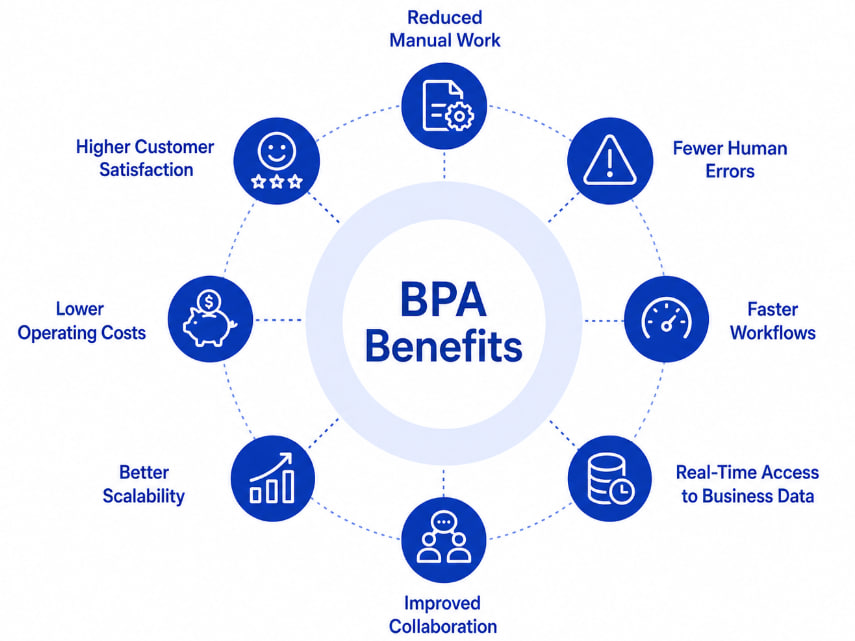
Automating the right processes, in the right order, lets a company keep what works while removing what doesn't.
FAQ
When should a business stop relying on spreadsheets?
Once a process involves several people updating the same data, needs real-time accuracy, or has grown complex enough that manual entry regularly causes delays or errors, it's time to move it into a dedicated system.
Which business processes should be automated first?
Start with the processes repeated most often and involving the most manual handling – typically data entry, client communication, invoicing, and reporting – since these offer the fastest, most visible return.
Do businesses need to replace spreadsheets completely?
No. Spreadsheets remain useful for simple calculations, one-off analysis, or quick ad hoc tasks. Critical, recurring business processes are better managed through dedicated automation systems built for accuracy and scale.